Open-Source Azure Entra ID Security Scanner: Automated Threat Discovery with Custom Extensibility
## The Problem Every CISO Knows Your Azure Entra ID tenant is the front door to your entire cloud estate. Behind that door: hundreds of app registrations with over-permissioned secrets, service principals with stale credentials, conditional access policies with gaps you don't know about, and attack paths that chain these misconfigurations into real breaches. Microsoft provides tools. They're scattered across Defender, Entra admin center, Azure Portal, and Graph API queries you run manually. None of them give you a unified, scored, actionable view of your Entra security posture — and none of them let your team extend the scanning with organization-specific checks.
We built one that does.
What It Does
The Azure Entra Security Scanner is a self-hosted, open-source tool that performs automated security assessments of your Azure Entra ID tenants. In under 5 minutes, it scans your entire tenant and surfaces findings across 13 security domains — then scores everything so you know what to fix first.
What Gets Scanned
The scanner runs a 10-phase pipeline that covers:
| Domain | What's Analyzed |
|---|---|
| App Registrations | Credentials, secret expiry, permission scope, owner chains |
| Service Principals | Enterprise apps, PIM eligibility, stale access |
| Conditional Access | Policy gaps, exclusion risks, grant control strength |
| Attack Paths | Lateral movement chains across apps, principals, and permissions |
| Virtual Machines | Network exposure, disk encryption, security extensions |
| Key Vaults | Access policies, secret management, network rules |
| Function Apps | Configuration security, trigger exposure, runtime settings |
| Identity Protection | Risky users, risky service principals |
| Security Alerts | Active Microsoft Defender incidents |
| Advanced Hunting | Custom KQL query results from Microsoft 365 Defender |
| Secure Score | Microsoft Secure Score metrics and control profiles |
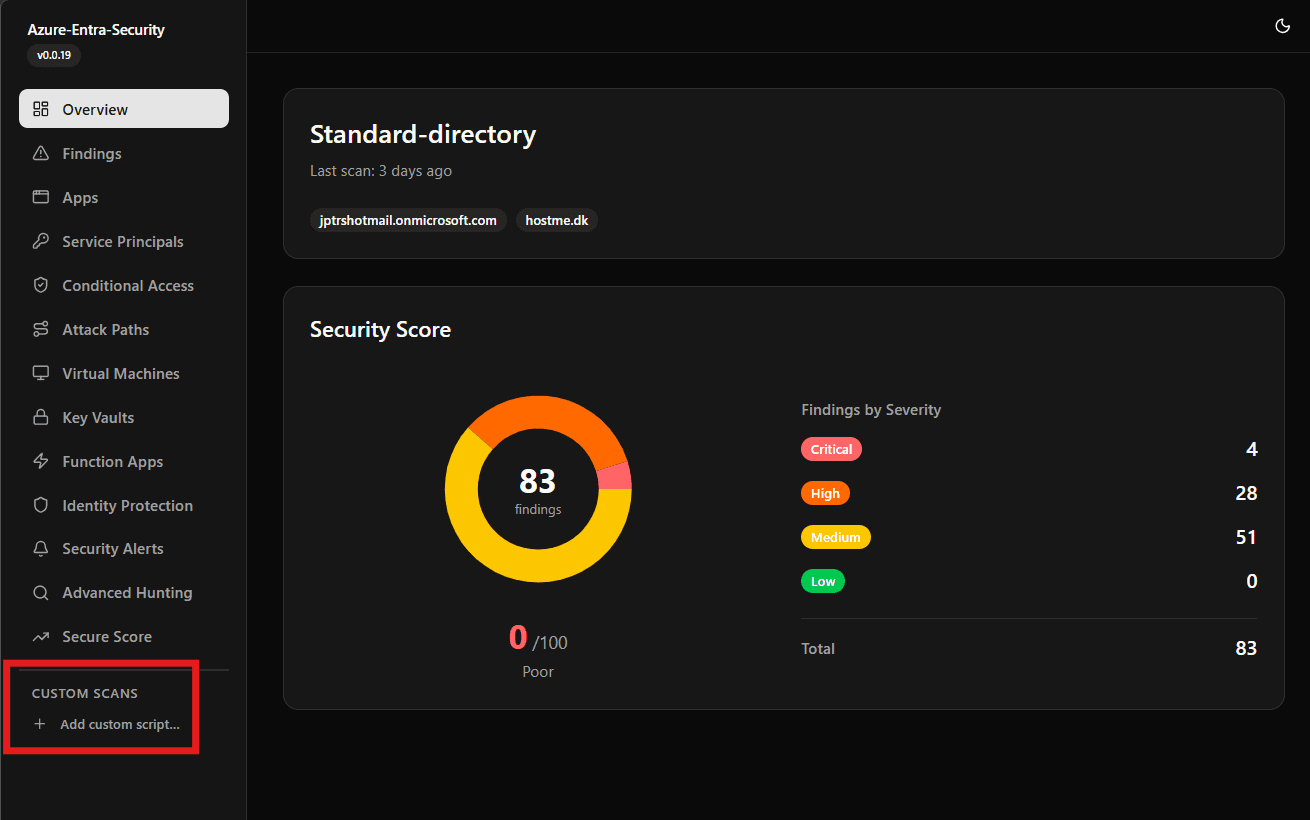
Every finding gets a severity rating. Every resource gets a risk score. The dashboard gives you sortable, filterable tables with drill-down into each finding — not a PDF you forward to someone else.
The Dashboard
A Next.js dashboard renders scan results in real-time with:
- Risk-scored overview per tenant with trend visualization
- 13 dedicated views — one per security domain — with sortable data tables
- Attack path visualization showing how misconfigurations chain together
- Methodology page explaining how scores are calculated (transparency builds trust)
Everything runs in Docker. No SaaS dependency, no data leaving your network.
The Custom Scripts System: Your Security Playbook, Codified
Here's where it gets interesting for teams with mature security practices.
Every organization has specific checks that generic scanners miss. Maybe you need to find users without hardware FIDO2 keys. Maybe you audit app registrations that bypass your naming convention. Maybe you check for service principals created outside your provisioning pipeline.
The Custom Scanner Plugin System lets your team write Python scripts that:
- Run with pre-authenticated Microsoft Graph and ARM clients — no credential handling
- Define their own dashboard tab — with typed columns, icons, and descriptions
- Execute safely — read-only by design, 60-second timeout, subprocess isolation
- Test before deploying — built-in test-run panel with tenant selection
How It Works (For Engineers)
You write a Python class that inherits from CustomScanner:
pythonfrom scanner.custom import Column, ColumnType, CustomScanner, ScanContext class StaleAppSecrets(CustomScanner): name = "Stale Secrets" description = "App registrations with secrets expiring within 30 days" icon = "key-round" columns = [ Column(key="app_name", label="Application", col_type=ColumnType.TEXT), Column(key="secret_name", label="Secret", col_type=ColumnType.TEXT), Column(key="expires", label="Expiry Date", col_type=ColumnType.DATE), Column(key="severity", label="Risk", col_type=ColumnType.SEVERITY), ] async def scan(self, context: ScanContext) -> list[dict]: apps = await context.graph.applications.get() # Your logic here — return rows matching column keys return rows
The framework handles everything else: authentication, execution, error isolation, result storage, and dashboard rendering. Your script becomes a new tab in the sidebar — automatically.
How It Works (For Decision Makers)
Your security engineers open a browser, click "Custom Scripts," write a check, test it against a real tenant, and activate it. Next scan, it runs alongside the built-in checks. Results show up in the same dashboard as everything else — same sortable tables, same severity badges, same export capabilities.
No deployment pipeline. No code review bottleneck for security checks. No vendor ticket to add a new scanning rule. Your team owns their security playbook.
Architecture: Why These Choices
Self-Hosted, Not SaaS
Your Entra ID data includes app credentials, permission grants, conditional access rules, and attack path maps. This is a blueprint for compromising your tenant. It never leaves your network.
The entire stack runs in Docker Desktop or any container orchestrator:
| Component | Technology | Role |
|---|---|---|
| Scanner | Python + Microsoft Graph SDK | Executes security assessments |
| Backend | Node.js + Azure Functions | API layer + Cosmos DB storage |
| Dashboard | Next.js + TanStack Table | Real-time security visualization |
| Sidecar | FastAPI | On-demand script test execution |
| Storage | Cosmos DB emulator + Azurite | Zero-cost local persistence |
Why Python for Scanning, TypeScript for the Stack?
Python is the lingua franca of security tooling. Your team already writes Python. The Microsoft Graph SDK for Python has first-class async support. Making them learn TypeScript to write security checks would kill adoption.
The dashboard and backend are TypeScript because Next.js gives us server-side rendering (fast initial loads with large datasets), and the Azure Functions runtime gives us a clean API layer with built-in Cosmos DB bindings.
Why Subprocess Isolation for Custom Scripts?
Every custom script runs in a fresh Python subprocess. Not imported via importlib. Not executed in the same process. This is deliberate:
- No memory leaks — each script gets a clean interpreter
- No module pollution — one script's imports can't affect another
- Hard timeout enforcement —
asyncio.wait_for()kills the subprocess cleanly - Crash containment — a segfault in a custom script doesn't take down the scanner
The trade-off is ~2 seconds of subprocess startup overhead per script. For security tooling that runs on a schedule, that's noise.
Deployment: 5 Minutes to First Scan
Prerequisites: Docker Desktop, an Azure AD App Registration with Directory.Read.All (application permission).
bashgit clone <repo> cp .env.example .env # Add TENANT_ID, CLIENT_ID, CLIENT_SECRET docker compose up -d # Start the stack docker compose run --rm scanner # Run first scan
Open http://localhost:3000. Your tenant's security posture is on screen.
What Permissions Are Needed?
The scanner uses read-only application permissions:
| Permission | Why |
|---|---|
Directory.Read.All | App registrations, service principals, users |
Policy.Read.All | Conditional access policies |
SecurityEvents.Read.All | Security alerts, risky users |
ThreatHunting.Read.All | Advanced hunting queries |
No write permissions. No admin consent for delegated access. The app registration is a read-only observer of your tenant.
What's Next
This tool is built for teams that take Entra ID security seriously but are tired of cobbling together PowerShell scripts, manual Graph API queries, and spreadsheet audits.
For security engineers: Write your organizational checks once, run them on every scan, see results in a real dashboard.
For security leaders: Get a single-pane view of your Entra security posture that your team can extend without vendor dependencies.
For compliance teams: Every finding is scored, timestamped, and stored locally — ready for audit evidence.
The scanner is open-source. Deploy it today, run your first scan, and see what your tenant is actually exposing.
Azure Entra Security Scanner v0.0.19 — Self-hosted, extensible, read-only by design.
Share this post
About JP Admin User
AI and software development enthusiast
Gallery
Related Posts

Azure Entra security scanner
The new feature for custom script
March 17, 2026

GitHub Copilot CLI brings AI assistance directly to your terminal
March 16, 2026

Azure Entra Security Scanner: new feature upload of script
Not sure if this "PAT" part will be the final solution, or i can make i better But the goal is to have a community to share custom scripts
March 14, 2026